



If you work with a nonprofit board, you already know the question behind every technology request: “How does this protect our mission and our donors?” 💛
In this episode of Stimulus Tech Talk, Nathan Whittacre shares a practical, budget-smart approach to board-ready cybersecurity for nonprofits, the kind that builds board confidence, protects donor trust, and keeps your team focused on impact.
🎧 Ready to go deeper? Listen to the full episode on your favorite podcast platform or watch on our YouTube channel.
Table of Contents
- Why nonprofit cybersecurity must be a board conversation
- What “good” looks like (minimum viable security stack)
- Volunteers & BYOD: the nonprofit twist
- Compliance without the alphabet soup (NIST mapping)
- Budget-smart security that scales with grants
- Choosing the right nonprofit MSP/IT partner
- 30-day action plan
- Copy/paste board language
- FAQ
Why Nonprofit Cybersecurity Is a Board Conversation
Boards carry fiduciary responsibility, reputational risk, and potential personal liability exposure. A cyber incident doesn’t just take systems offline—it can:
- Damage donor confidence and fundraising momentum
- Interrupt services for clients and communities
- Force restricted dollars into crisis response
- Trigger reporting obligations tied to grants and regulations
Core principle: treat your nonprofit like a well-run business when it comes to data, access, and financial controls. That discipline improves resilience, strengthens grant competitiveness, and protects the people you serve.
What “Good” Looks Like: A Minimum Viable Security Stack
You don’t need every tool under the sun. You do need a few non-negotiables that you can enforce and report on.
Non-negotiable controls (board-friendly)
- MFA everywhere: email, file sharing, CRM, accounting, donor platforms
- Patching cadence + proof: automated updates with compliance reports
- EDR/MDR coverage: detection & response on endpoints and servers
- Tested backups: immutable/off-site where possible + documented restore tests
- Least-privilege access: role-based permissions + clean offboarding
📌 Board tip: Provide a one-page monthly dashboard showing:
- MFA coverage %
- Patch compliance %
- EDR agent coverage %
- Backup last test date + pass/fail
- Top 3 risks (owner + due date)
Trends over time build confidence.
Volunteers & BYOD: The Nonprofit Twist
Volunteers, interns, and personal devices are a strength—until expectations aren’t clear.
What to implement (simple + enforceable)
- Volunteer access policy: requires MFA, defines allowed systems, limits access to “minimum necessary”
- BYOD standards:
- Screen lock + auto-lock
- Disk encryption where possible
- No shared “family logins”
- No local storage of client/donor files
- On/Offboarding checklist: access granted / removed / device verified
How to message it (mission-aligned)
“We’re trusted with people and resources—this is how we honor that trust.”
Compliance Without the Alphabet Soup
Requirements depend on services and funding (HIPAA, state privacy laws, grant conditions, etc.). A practical path:
Use one framework as your “operating system”
Align to a well-known framework like NIST, then map grant and legal obligations to it. That gives you one playbook to run and measure.
Practical steps (low drama, high clarity)
- Inventory grants + regulatory obligations
- Map each requirement to a specific control (MFA, encryption, logging, retention, etc.)
- Maintain a simple control matrix you can hand to auditors, program officers, or the board
Budget-Smart Security: Scale With Grants and Seasons
Cash flow is real. The answer isn’t delaying security, it’s right-sizing and scaling responsibly.
Budget-friendly moves Nathan recommends
- Ask vendors for nonprofit pricing + user-based licensing
- Build a phase plan (example below)
- Tie security reporting to grant cycles to justify renewals with outcomes
Example phase plan
- Quarter 1: MFA + backups + offboarding checklist
- Quarter 2: EDR/MDR + patch automation
- Quarter 3: security awareness training + phishing simulations
- Quarter 4: tabletop incident exercise + policy refresh + board reporting maturity
How to Choose the Right IT Partner (MSP) for a Nonprofit
Not all providers understand volunteer access, program audits, or grant-funded reality. Ask these during interviews:
The best nonprofit MSP questions to ask
- Nonprofit experience: “Which nonprofits do you support, and what challenges did you solve?”
- Security stack: “Do you deliver MFA, patching, EDR/MDR, and tested backups by default?”
- Compliance literacy: “How do you map controls to NIST and produce board-ready reports?”
- Scalability: “Can you scale services with seasonal programs and grant funding?”
- Response & accountability: “What’s your SLA, and how do we see it in monthly metrics?”
🚩 Red flag: A “friend of the org” who can’t show process, coverage, and reporting. Good intentions don’t equal protection.
30-Day Action Plan (Board-Ready and Doable)
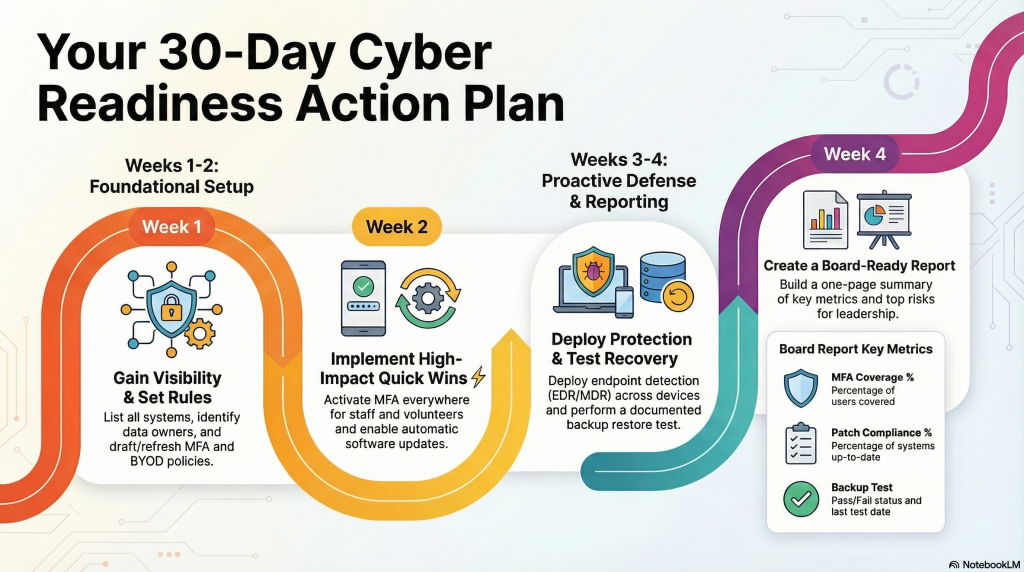
A simple 30-day path to board-ready cybersecurity: MFA, patching, protection, tested backups, and clear reporting
Week 1: Visibility & Policy
- List your systems (email, CRM, donor platform, accounting, file storage)
- Identify data owners
- Draft/refresh your MFA policy + Volunteer/BYOD policy
Week 2: Quick Wins ⚡
- Turn on MFA everywhere (staff + volunteers)
- Enable automatic updates; schedule patch windows
Week 3: Protection & Recovery
- Deploy EDR/MDR across endpoints; verify coverage
- Test backups and document: what restored, when, and how long it took
Week 4: Reporting & Board Readout
Build a one-page cyber assurance report with:
- MFA coverage %
- Patch compliance %
- EDR coverage %
- Backup test pass/fail + date
- Top 3 risks + owners + due dates
Present to the board (or finance/governance committee) and set a quarterly review cadence.
Copy/Paste: Board-Ready Language for Your Next Packet
- Mission assurance: “These controls ensure our technology serves our mission and the people we support.”
- Donor stewardship: “We safeguard donor funds and data through MFA, patching, EDR/MDR, and tested backups.”
- Proof over promises: “We measure and report coverage monthly; our goal is 98%+ compliance across core controls.”
- Volunteer access: “Volunteers follow the same security standards as staff, with least-privilege access and clear offboarding.”
Keep Learning with Stimulus Tech Talk
Want the full discussion with pragmatic examples and board-friendly language? Listen on your favorite podcast platform or watch on our YouTube channel.
If you’d like help tailoring this roadmap to your nonprofit’s size, programs, and grants, the team at Stimulus Technologies can help. Let’s make your next board meeting a confident “yes.”
FAQ
What cybersecurity metrics should a nonprofit board review monthly?
MFA coverage %, patch compliance %, EDR/MDR coverage %, backup test results, and top risks with owners and due dates.
What is the minimum cybersecurity stack for nonprofits?
MFA, patching, EDR/MDR, tested backups, and least-privilege access with strong offboarding.
How should nonprofits handle volunteer access and BYOD?
Require MFA, enforce least privilege, set device standards (screen lock/encryption), and use a consistent on/offboarding checklist.



