
When your business was smaller, DIY IT made sense. Your office manager handled password resets, someone on the team knew how to restart the router, and that one “tech-savvy” employee became the go-to person whenever something broke. It felt practical because it was practical for where you were at the time.
But here’s what most business owners don’t hear until it’s already a problem: the systems that carry you through the early years are rarely the same systems that carry you through the next stage of growth. More employees means more devices, more software, more passwords, more data, and more chances for something important to break at the worst possible time. What once felt like a reasonable workaround can start to look a lot more like a liability.
So how do you know when you’ve outgrown your current IT setup? Here are five signs worth paying attention to.
1. You Have an Unofficial IT Person
Every business has one: the person who’s “pretty good with computers.” They fix the printer, help people log in, call the internet provider when the Wi-Fi goes down, and troubleshoot issues when something stops working. They might even be the only one who knows where certain passwords, devices, or software licenses are stored.
The problem isn’t that person. They’re trying to help, and they deserve credit for it. The problem is that they already have a full-time job, and your business is quietly depending on them for something they were never hired to do. When that person is busy, out sick, on vacation, or eventually moves on, you find out quickly how much was living in their head.
IT needs to be a system, not a favor someone handles between meetings. Have you ever wondered what would happen if your unofficial IT person left tomorrow?
2. You Fix Things When They Break
If your IT strategy is reactive, you’re already paying for it in ways that may not show up on an invoice. Lost hours, frustrated employees, missed deadlines, interrupted service, and stalled work all add up, even if they never appear as a neat line item in your budget.
Reactive IT can feel cheaper in the short term, but it rarely is. Proactive monitoring, regular maintenance, security updates, backup checks, and a clear plan for catching problems before they interrupt the workday are what keep a business moving without the constant scramble. The difference between reactive and proactive IT isn’t just technical; it’s the difference between running your business and constantly putting out fires.
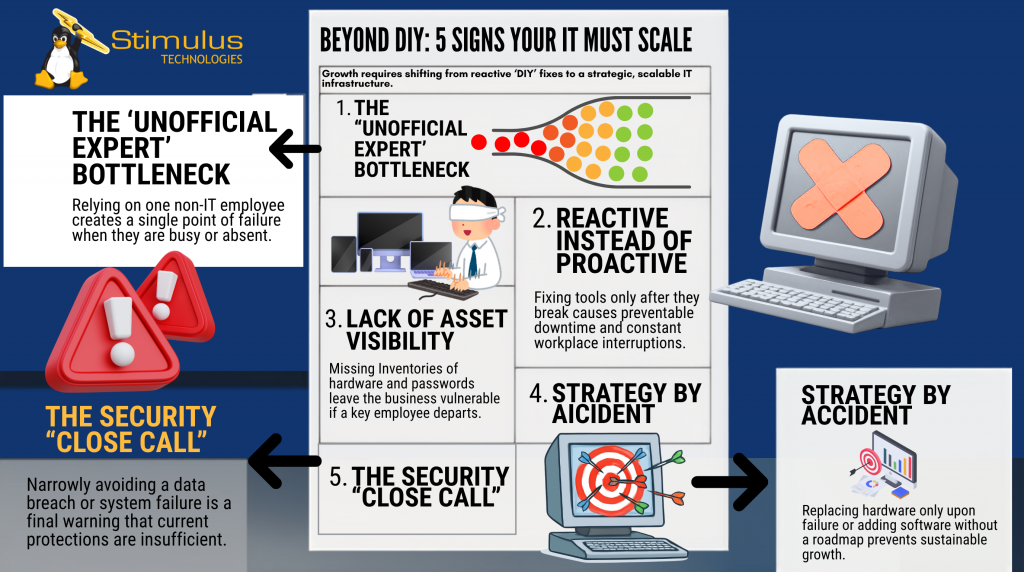
If your business depends on one “tech-savvy” employee, reacts only when systems break, or has already had a security close call, it may be time to move beyond DIY IT and build a scalable support model.
3. Nobody Knows What You Actually Have
Here’s a question worth sitting with: do you know exactly what devices, software, accounts, systems, and user access your business has right now? Most business owners don’t, and that creates more risk than people realize.
Without clear visibility, you may not know:
- Who still has access to company data after they leave
- Which devices are outdated
- Which software licenses are still being used
- Where important passwords are stored
- What was on a laptop if it went missing
- Which systems need updates, backups, or extra protection
Good IT starts with knowing what you have. You can’t protect what you can’t see, and you can’t make smart decisions about systems you haven’t fully accounted for.
4. Your Technology Decisions Happen by Accident
This one tends to sneak up on businesses. A team member needs a tool, so a new subscription gets added. A computer dies, so it gets replaced quickly. Someone finds an app that solves a short-term problem, so the whole company starts using it. None of those decisions seem significant on their own.
But over time, those small decisions create a disconnected, hard-to-manage IT environment full of tools that don’t work well together, software nobody owns, monthly costs nobody reviews, and security gaps nobody planned for. That is the hidden cost of figuring it out as you go.
Your technology should support where your business is going, not just where it’s been. That takes a roadmap, but not a complicated one. You need a clear, practical plan that answers the basics: what do we have, what needs attention, what needs to go, what needs better protection, and what will we need as we grow? Without that plan, technology becomes something your business reacts to instead of something that helps your business move forward.
5. You’ve Had a Close Call
Most business owners know this feeling. Someone clicked a suspicious email but caught it just in time. A backup almost wasn’t there when it was needed. A laptop went missing, and nobody was sure what was on it. A system almost failed at the worst possible time. A former employee had access longer than they should have.
Nothing terrible happened, but it could have. That moment matters because a close call is often the point where business owners realize their current setup isn’t keeping pace with their risk. The goal isn’t to scare yourself into action; it’s to be honest about where things stand before a close call becomes something worse.
Outgrowing Your IT Setup Is a Sign of Growth
Here’s the part that often gets missed: if your current IT setup isn’t working the way it should, it doesn’t mean you did something wrong. It usually means your business has grown, and the systems that worked in the early days were never designed to scale with you.
That’s normal, but ignoring the signs tends to make the eventual fix harder, riskier, and more expensive than it needed to be. At Stimulus Technologies, we work with businesses that are ready to move beyond the reactive, accidental approach to IT and build something that actually supports where they’re headed.
Want to go deeper? Watch our webinar, Your Accidental IT Person Is Drowning: How to Build a Scalable IT Support Model, and learn how to move from reactive fixes to a support model that can grow with your business: https://events.stimulustech.com/scalable-it-support-webinar
If any of these five signs feel familiar, it might be worth a conversation.
👉 Book a discovery call at stimulustech.com/discoverycall
FAQ: Outgrowing Your Current IT Setup
What does it mean to outgrow your IT setup?
It means the way you used to handle technology no longer fits the size, pace, or risk level of your business. What worked with a small team may not be enough once you have more employees, devices, software, data, and security concerns.
How do I know if my business is relying on DIY IT?
You may be relying on DIY IT if one non-IT employee handles most tech problems, you only fix issues after they break, or no one has a clear record of your devices, software, passwords, and user access.
Why is reactive IT a problem?
Reactive IT often looks cheaper at first, but it can cost your business in lost time, downtime, frustrated employees, missed deadlines, and avoidable security risks. Proactive IT helps catch problems before they interrupt your workday.
What is an accidental IT person?
An accidental IT person is an employee who was not hired for IT but became the go-to person for tech issues because they are “good with computers.” They may be helpful, but relying on them creates risk because IT is not their actual role.
When should a business consider managed IT support?
A business should consider managed IT support when technology issues are slowing down work, security concerns are growing, systems are not documented, or the company needs a more reliable plan for growth. The goal is to move from quick fixes to a scalable support model.
What is the first step toward better IT support?
The first step is understanding what you have now. A network assessment can help identify your devices, systems, access, risks, and gaps so you can build a smarter IT plan going forward.